Cards still getting damaged with vertical lines in multiple spots after installing 3D part
I originally installed the 5.25mm part in my Ricoh and noticed after a while that I was still getting damage on my pokemon cards. I recently received the smaller 4.5mm part and figured that would solve it, but it didn't. The part is a lot more responsive and definitely gives exactly the same look and feel as the part in your videos, however I still get that stripey damage on the back of my cards in multiple spots. Pic attached for reference.
Anyone with a brilliant suggestion?
Evidence / Attachments
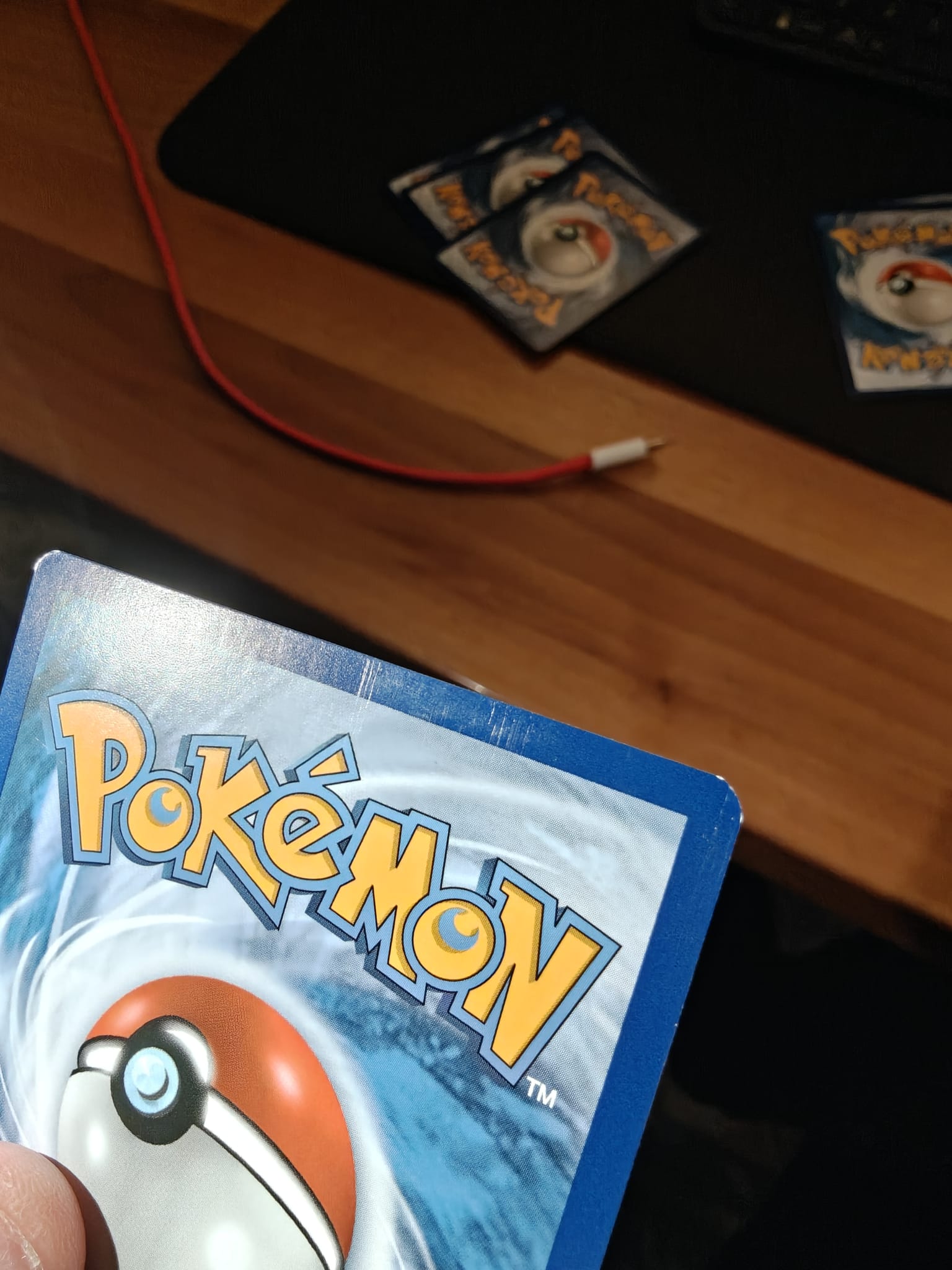
I am running into the same problem. I was wondering if this was happening after one pass through the scanner or is this from multiple passes?
For me its cumulative. So the picture attached is after five passes and its become very noticeable, but its already visible after one pass. One cards sub-NM it doesnt matter that much if its just one pass as the quality isnt really affected, but for more expensive cards and cards with pristine backs its an immediate no-go to use the scanner, which is obviously a shame and something I'd like to fix. But currently don't have the answers yet:(
Have you pulled the roller out of the scanner also? I scan with penny sleeves on now that I have changed out the feeder arm with Maxwaxpax’s feeder arm he sells in his store here at Hobby Network. This helps a lot with scratches when the card feeds through the scanner.